Instructions
Install the Claude Code Extension in VS Code

Open Settings
Windows: Ctrl + ,
Mac: Cmd + ,
Open Settings.json
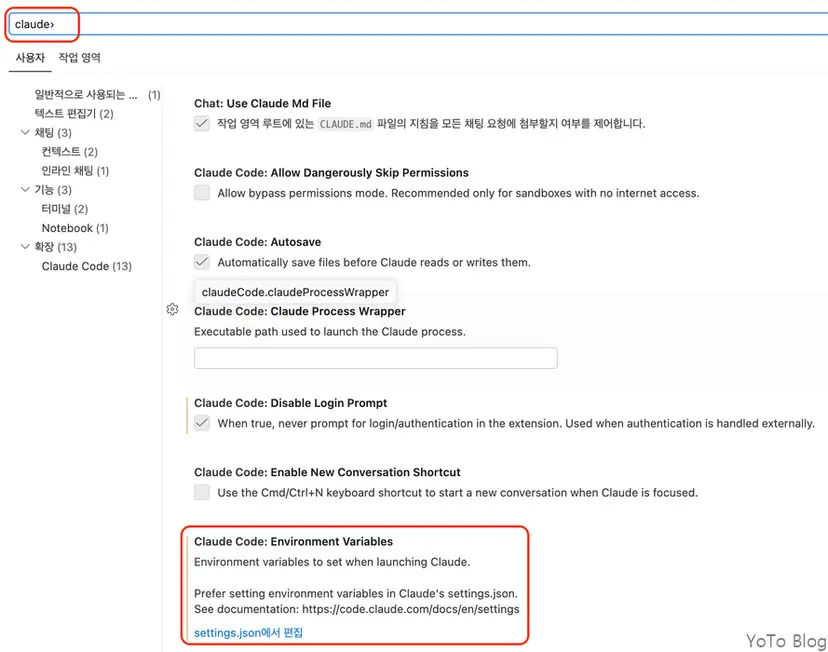
Search for "claude" at the top and click Edit in settings.json.
Enter Configuration
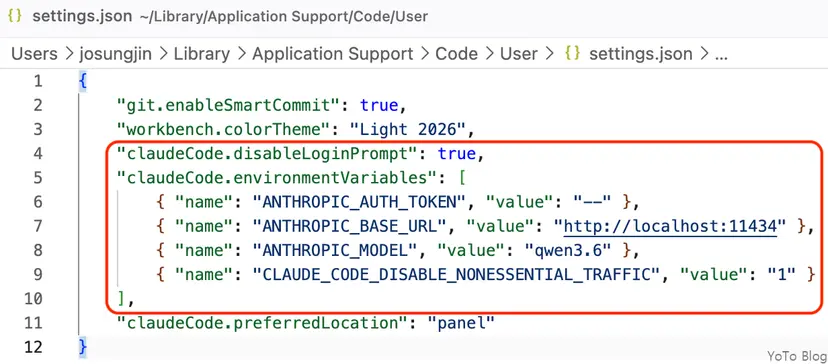
    "claudeCode.disableLoginPrompt": true,
    "claudeCode.environmentVariables": [
        { "name": "ANTHROPIC_AUTH_TOKEN", "value": "--" },
        { "name": "ANTHROPIC_BASE_URL", "value": "http://localhost:11434" },
        { "name": "ANTHROPIC_MODEL", "value": "qwen3.6" },
        { "name": "CLAUDE_CODE_DISABLE_NONESSENTIAL_TRAFFIC", "value": "1" }
    ]
Configuration Details
- claudeCode.disableLoginPrompt -> Disables the Claude Code login prompt.
- ANTHROPIC_AUTH_TOKEN -> Must be set to any value to bypass the login prompt.
- ANTHROPIC_BASE_URL -> The address of your local LLM server.
- ANTHROPIC_MODEL -> The name of the model (e.g., qwen3.6:27b, etc.).
- CLAUDE_CODE_DISABLE_NONESSENTIAL_TRAFFIC -> Disables telemetry and surveys.